
Friday, 6 February 2015

Tuesday, 20 January 2015
UNIT 2 M2
Suggest an alternative system to the one for p4.
Make direct comparisons whether that be cost or the quality of the system.
Conclude by making a decision on which system should be purchased and why.
Apple Macs can be a difficult operating system to get the hang of unless you use them frequently, if you are not comfortable with using an Apple Mac then a Windows PC maybe for you. As well as that you need to decide what make and model you would like to have and also how you want your computer to run. And most importantly how much money are you willing to pay for it.
For a Windows operating system I am recommending the HP Pavillion 500-319 Desktop PC with a 23xi Full HD 23" IPS LED Monitor.


WACOM Intuos Pro Medium Special Edition PTH-651S-ENES Graphics Table
Ambidextrous design
Customisable key
ExpressKeys
With stylus
Other features
Stylus with eraser
GENERAL
Colour: Silver and black
System requirements- Windows 8
- Windows 7
- Windows Vista SP3 or Windows XP
- Mac OS X 10.5.8 or higher
- Intel®-processor
Software included Driver
Box contents Wacom wireless kit

Conclusion
Cost: The monitor and the desktop come are a joint purchase and costs £699.99. The graphics tablet costs £299.99 and comes together for £1000 which is cheaper than the Apple product as that is £1,800.
Recommendation: My recommendation depends on what you are looking. If you are looking for a good quality PC but still able to run the basic programs and devices I would recommend the HP Pavillion PC.
However if you are looking for a PC that produces high quality work then I would recommend an Apple Mac.
It supports all software that you may want to install on your system and also has more than enough room in storage space to store your work as well as run all of the necessary programs.
Photoshop
Apple Macs can be a difficult operating system to get the hang of unless you use them frequently, if you are not comfortable with using an Apple Mac then a Windows PC maybe for you. As well as that you need to decide what make and model you would like to have and also how you want your computer to run. And most importantly how much money are you willing to pay for it.
For a Windows operating system I am recommending the HP Pavillion 500-319 Desktop PC with a 23xi Full HD 23" IPS LED Monitor.
WACOM Intuos Pro Medium Special Edition PTH-651S-ENES Graphics Table
Ambidextrous design
Customisable key
ExpressKeys
With stylus
Other features
Stylus with eraser
GENERAL
Colour: Silver and black
System requirements- Windows 8
- Windows 7
- Windows Vista SP3 or Windows XP
- Mac OS X 10.5.8 or higher
- Intel®-processor
Software included Driver
Box contents Wacom wireless kit
Conclusion
Cost: The monitor and the desktop come are a joint purchase and costs £699.99. The graphics tablet costs £299.99 and comes together for £1000 which is cheaper than the Apple product as that is £1,800.
Recommendation: My recommendation depends on what you are looking. If you are looking for a good quality PC but still able to run the basic programs and devices I would recommend the HP Pavillion PC.
However if you are looking for a PC that produces high quality work then I would recommend an Apple Mac.
It supports all software that you may want to install on your system and also has more than enough room in storage space to store your work as well as run all of the necessary programs.
Photoshop
- Intel® Pentium® 4 or AMD Athlon® 64 processor (2 GHz or faster)
- Microsoft® Windows® 7 with Service Pack 1, Windows 8, or Windows 8.1
- 2 GB of RAM (8 GB recommended)
- 2 GB of available hard-disk space for installation; additional free space required during installation (cannot install on removable flash storage devices)
- 1024x768 display (1280x800 recommended) with 16-bit color and 512 MB of VRAM (1 GB recommended)**
- OpenGL 2.0–capable system
- Internet connection and registration are necessary for required software activation, validation of subscriptions, and access to online services.
Lightroom
- Intel Pentium or AMD Athlon 64 processor*
- Microsoft Windows 7 with Service Pack 1, Windows 8, or Windows 8.1
- 2 GB of RAM (8 GB recommended)
- 2 GB of available hard-disk space; additional free space required during installation (cannot install on removable flash storage devices)
- 1024 x 768 display
- DirectX 10-capable or later video adapter
- Internet connection and registration are necessary for required software activation, membership validation, and access to online services.
Illustrator
- Intel Pentium 4 or AMD Athlon 64 processor
- Microsoft Windows 7 with Service Pack 1, Windows 8, or Windows 8.1
- 1 GB of RAM (3 GB recommended) for 32 bit; 2 GB of RAM (8 GB recommended) for 64 bit
- 2 GB of available hard-disk space for installation; additional free space required during installation (cannot install on removable flash storage devices)
- 1024 x 768 display (1280 x 800 recommended)
- To view Illustrator in HiDPI mode, your monitor must support a resolution of 1920 x 1080 or more. For more information, see Enhanced Windows Support: HiDPI devices
- To use the new Touch workspace in Illustrator, you must have a touch screen enabled tablet/monitor running Windows 8.1. (Microsoft Surface Pro 3 recommended).
- Optional: To use GPU Performance: (NVIDIA video adapter listed below (medium/high-end recommended); 1 GB of VRAM (2 GB recommended); and latest NVIDIA drivers for optimal performance (recommended driver version 335.23 or later (for GeForce series), version 332.76 or later (for Quadro series)
- The following NVIDIA video adapter series support the new Windows GPU Performance features in Illustrator:
- Quadro K Series
- Quadro 6xxx
- Quadro 5xxx
- Quadro 4xxx
- Quadro 2xxx
- Quadro 2xxxD
- Quadro 6xx
- GeForce GTX Series (4xx, 5xx, 6xx, 7xx, Titan)
- Internet connection and registration are necessary for required software activation, validation of subscriptions, and access to online services
Indesign
- Intel Pentium 4 or AMD Athlon 64 processor
- Microsoft Windows 7 with Service Pack 1, Windows 8, or Windows 8.1
- 2 GB of RAM (8 GB recommended)
- 2.6 GB of available hard-disk space for installation; additional free space required during installation (cannot install on removable flash storage devices)
- 1024 x 768 display (1280 x 800 recommended) with 32-bit video card; supports HiDPI display
- Adobe® Flash® Player 10 software required to export SWF files
- Internet connection and registration are necessary for required software activation, validation of subscriptions, and access to online services
Friday, 16 January 2015
CONS FOR P4 UNIT 2 (M1)
MONITOR - RESOLUTION ( SMALL MONITOR, YOU AREN'T GOING GET BIG ENOUGH COVERAGE TO DRAW WHEREAS A HIGH RESOLUTION HDMI MONITOR THE QUALITY IS CLEARER AND MUCH MORE SHARPER AND YOU GET BETTER COVERAGE WITH BIGGER SCREENS)
DIGITAL CAMERA - TYPE OF LENS, MEGAPIXELS ( WHEN CAPTURING THE PHOTOS, THE HIGHER THE MEGAPIXELS THE BETTER THE QUALITY THE IMAGE IS) SD AND MEMORY ( IF YOU DON'T HAVE A HIGH ENOUGH STORAGE YOU WILL HAVE TROUBLE TAKING AND STORING MORE PHOTOS THAN THE CAMERA CAN TAKE)
SCANNER - SIZE ( SOME SCANNERS COME IN A STANDARD FORM AND WILL ONLY SCAN A4 BUT IF YOU ARE WORKING WITH A3 OR LARGER YOU WILL NEED A BIGGER SCANNER) GLASS/ DUST/ SCRATCHES (WHEN THINGS ARE SCANNED EVERYTHING IS PICKED UP BY THE SCANNER, SO WHEN YOU ARE PLACING THE PAPER ON THE SCANNER YOU NEED TO MAKE SURE THERE ARE NO FINGERPRINTS OR DUST AS THE IMAGE WON'T BE AS CLEAR)
PRINTER - SIZE ( IF YOU WOULD LIKE TO PRINT ON A3 OR LARGER YOU WILL NEED A BIGGER MACHINE, THIS IS ALSO TRUE IF YOU WOULD LIKE TO PRINT ON THICKER PAPER - 100GSM OR HIGHER)
PHOTOSHOP AND ILLUSTRATOR - PRICE (IF YOU ARE A GRAPHIC DESIGNER YOU WILL POSSIBLY NEED PROGRAMS LIKE THESE IN ORDER TO CREATE YOUR WORK, UNFORTUNATELY THEY ARE NOT FREE SO PAYING FOR THEM CAN BE EXPENSIVE) KNOWLEDGE ( THESE PROGRAMS HAVE A LOT OF FEATURES THAT GRAPHIC DESIGNERS CAN CHOOSE FROM AND LEARNING THEM ALL CAN TAKE A WHILE AND IN ORDER FOR YOU TO KNOW EVERYTHING YOU NEED TO TAKE A COURSE WHICH MAY TAKE A COUPLE OF YEARS)
DIGITAL CAMERA - TYPE OF LENS, MEGAPIXELS ( WHEN CAPTURING THE PHOTOS, THE HIGHER THE MEGAPIXELS THE BETTER THE QUALITY THE IMAGE IS) SD AND MEMORY ( IF YOU DON'T HAVE A HIGH ENOUGH STORAGE YOU WILL HAVE TROUBLE TAKING AND STORING MORE PHOTOS THAN THE CAMERA CAN TAKE)
SCANNER - SIZE ( SOME SCANNERS COME IN A STANDARD FORM AND WILL ONLY SCAN A4 BUT IF YOU ARE WORKING WITH A3 OR LARGER YOU WILL NEED A BIGGER SCANNER) GLASS/ DUST/ SCRATCHES (WHEN THINGS ARE SCANNED EVERYTHING IS PICKED UP BY THE SCANNER, SO WHEN YOU ARE PLACING THE PAPER ON THE SCANNER YOU NEED TO MAKE SURE THERE ARE NO FINGERPRINTS OR DUST AS THE IMAGE WON'T BE AS CLEAR)
PRINTER - SIZE ( IF YOU WOULD LIKE TO PRINT ON A3 OR LARGER YOU WILL NEED A BIGGER MACHINE, THIS IS ALSO TRUE IF YOU WOULD LIKE TO PRINT ON THICKER PAPER - 100GSM OR HIGHER)
PHOTOSHOP AND ILLUSTRATOR - PRICE (IF YOU ARE A GRAPHIC DESIGNER YOU WILL POSSIBLY NEED PROGRAMS LIKE THESE IN ORDER TO CREATE YOUR WORK, UNFORTUNATELY THEY ARE NOT FREE SO PAYING FOR THEM CAN BE EXPENSIVE) KNOWLEDGE ( THESE PROGRAMS HAVE A LOT OF FEATURES THAT GRAPHIC DESIGNERS CAN CHOOSE FROM AND LEARNING THEM ALL CAN TAKE A WHILE AND IN ORDER FOR YOU TO KNOW EVERYTHING YOU NEED TO TAKE A COURSE WHICH MAY TAKE A COUPLE OF YEARS)
Friday, 9 January 2015
UNIT 30 (P2)
UNIT 30 Task 2
The school also need to produce brochures and materials that
can be used at option and parent's evenings, they also want to display
graphical images on the Kingswood
website and on school vehicles. You need
to recommend the file types needed to display the images in the locations and
justify the reasons for your choice.
|
|
Graphic Type
|
Describe How The
Graphic Is Constructed And Why You Chose The Graphic Type?
|
How Will The Final
File Be Saved?
|
|
Internet Graphic
|
JPEG
|
JPEG is a common
format that is used in digital photography and it is also the most common
format for storing and transferring images online. So the images on the website would support
this file.
|
JPEG
|
|
Van Sign Graphic
|
PDF/TIFF
|
In order to print
graphics on to a vehicle you need to use vector graphics. PDF supports vector
graphics and allows you to edit your image by adding patterns and shading. A
PDF file will have a fixed resolution so it will help when looking at an
image at close range as it would be just as clear if you were looking at the
image from a distance. TIFF is also a good image format when it comes to high
resolution images as it supports high colour-depth images as well as JPEG.
TIFF is good for handling images and data in one file as well as holding
compressed images. In making the graphics for a vehicle you will need to
produce your images in Photoshop and save it as a TIFF file. Make your logos
or illustration in Illustrator and save as a PDF. Finalise your work on
InDesign once this is finished you can print in a PDF file.
|
PDF
|
|
Brochure
|
JPEG
|
Using JPEG images for
images on paper is also a common file
to use as the images are clear and depending on the size of the image you can manipulate it
and the image will still remain the same with a small amount of quality lost.
|
JPEG
|
Monday, 15 December 2014
UNIT 30 (P1)
Task 1
To create the materials needed, you will need to create graphic images. You need to specify and describe the hardware and software needed to create the imagery digitally. Consider the computer system, input devices, output devices and also file storage.
Choosing a computer you want to buy depends entirely on the consumer. You may be used to specific operating systems like Windows or Mac so changing your operating system may not be a good idea if you don’t want to try something new. But if you do want to change you need to make sure that you have fully research how the operating system works and whether it would be ideal for you. As well as that you need to decide what make and model you would like to have and also how you want your computer to run. And most importantly how much money are you willing to pay for it.
With the cost of your computer being the most important you also need to find the computer with the best specification to suit your budget. As technology is always being updated and developed it would probably be best to buy a computer that is fairly up to date, if not then your computer will go out of date pretty quickly.
I am recommending an Apple Mac computer because Macs are often used by designers and each Mac is best for different types of work. Most graphic designers work on a digital format and Mac offers a wide range of software support.
Graphic design is also a varied subject and the computer need to be able to use Photoshop, interactive design, animation and even 3D design. All of these need different computer skills and different computer setups.
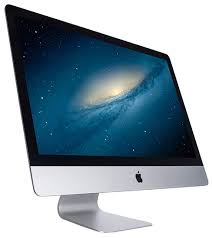
Graphic Designers need a big canvas to work on , or in this case a big screen. Naturally Macs are better for this as well as the quality of the images on the screen are displayed. A MacBook Pro with a Retina Display or a 27-inch iMac are the ones that naturally lead us to this. Design work can use up a lot of the computers processor and memory especially when it comes to designing work in 3D, also the sizes of the files are very large and need a lot of room to save so for this kind of work you need to have a fast running system and a lot of hard drive room. Thankfully you can get additional hard drives so you have extra room to save files.
However Mac's are not suited for every designer. Apple computers come with a 'glossy' display and these are best for video and digital graphic design work, but these displays do not offer the same quality of printing as 'matt' displays so print designers tend not to use Apple computers.
If you work in magazine, leaflet/flyer creation or product packaging development then you may prefer to use a high quality matt monitor.
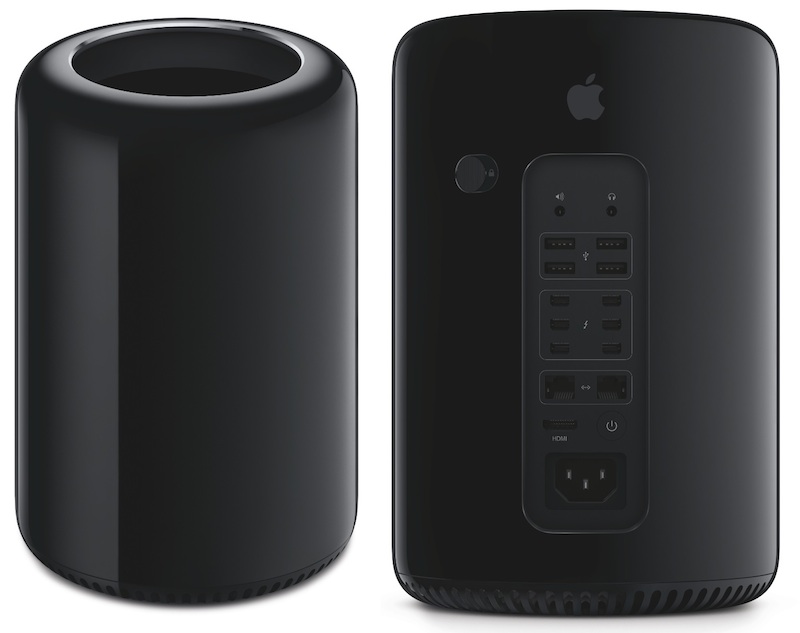
Traditionally designers have chosen Mac Pro computers, and the new Mac Pro's are powerful - maybe a little more powerful than anyone need.
Specification
Apple Mac Pro is £2,499 and that's before you add a monitor. For a more cost-effective option is to choose a Mac mini and connect to a second screen.
3.7GHz
Quad-Core
Intel Xeon E5 with 10MB L3 cache and Turbo Boost up to 3.9GHz
Configurable to 3.5GHz 6-core processor with 12MB L3 cache, 3.0GHz 8-core processor with 25MB L3 cache or 2.7GHz 12-core processor with 30MB L3 cach
12GB
DDR3 ECC memory
12GB (three 4GB) of 1866MHz DDR3 ECC memory
Configurable to 16GB (four 4GB), 32GB (four 8GB) or 64GB (four 16GB)
Dual AMD FirePro
D300
graphics processors
Dual AMD FirePro D300 graphics processors with 2GB of GDDR5 VRAM each
1,280 stream processors
256-bit-wide memory bus
160GB/s memory bandwidth
2 teraflops performance
Configurable to dual AMD FirePro D500, each with 3GB GDDR5 VRAM, 1,526 stream processors, 384-bit-wide memory bus, 240GB/s memory bandwidth and 2.2 teraflops performance; or dual AMD FirePro D700, each with 6GB of GDDR5 VRAM, 2,048 stream processors, 384-bit-wide memory bus, 264GB/s memory bandwidth and 3.5 teraflops performance
Mac Mini
Starting from £399.
1.4GHz
1.4GHz dual-core Intel Core i5 (Turbo Boost up to 2.7GHz) with 3MB on-chip shared L3 cache
500GB (5400-rpm) hard drive
Configurable to 1TB Fusion Drive.
4GB of 1600MHz LPDDR3 memory
Configurable to 8GB or 16GB
Intel HD Graphics 5000
Minimum Software Requirements:
Photoshop:
Multicore Intel processor with 64-bit support
Mac OS X v10.7, v10.8, v10.9, or v10.10
2 GB of RAM (8 GB recommended)
3.2 GB of available hard-disk space for installation; additional free space required during installation (cannot install on a volume that uses a case-sensitive file system or on removable flash storage devices)
1024x768 display (1280x800 recommended) with 16-bit color and 512 MB of VRAM (1 GB recommended)
OpenGL 2.0–capable system
Internet connection and registration are necessary for required software activation, membership validation, and access to online services.
LightRoom:
Multicore Intel processor with 64-bit support
Mac OS X Server v10.7, v10.8, v10.9, or v10.10
2 GB of RAM (8 GB recommended)
2 GB of available hard-disk space; additional free space required during installation (cannot install on a volume that uses a case-sensitive file system or on removable flash storage devices).
1024 x 768 display
Internet connection and registration are necessary for required software activation, membership validation, and access to online service
Illustrator:
Multicore Intel processor with 64-bit support
Mac OS X v10.7, v10.8, v10.9, or v10.10
2 GB of RAM (8 GB recommended)
2 GB of available hard-disk space for installation; additional free space required during installation (cannot install on a volume that uses a case-sensitive file system or on removable fl ash storage devices)
1024 x 768 display (1280 x 800 recommended)
Internet connection and registration are necessary for required software activation, validation of subscriptions, and access to online services
InDesign:
Multicore Intel processor
Mac OS X v10.7, v10.8, v10.9, or v10.10
2 GB of RAM (8 GB recommended)
2.6 GB of available hard-disk space for installation; additional free space required during installation (cannot install on a volume that uses a case-sensitive file system or on removable flash storage devices)
1024 x 768 display (1280 x 800 recommended) with 32-bit video card; supports Retina display
Adobe® Flash® Player 10 software required to export SWF files.
Internet connection and registration are necessary for required software activation, validation of subscriptions, and access to online services
With the cost of your computer being the most important you also need to find the computer with the best specification to suit your budget. As technology is always being updated and developed it would probably be best to buy a computer that is fairly up to date, if not then your computer will go out of date pretty quickly.
I am recommending an Apple Mac computer because Macs are often used by designers and each Mac is best for different types of work. Most graphic designers work on a digital format and Mac offers a wide range of software support.
Graphic design is also a varied subject and the computer need to be able to use Photoshop, interactive design, animation and even 3D design. All of these need different computer skills and different computer setups.
Graphic Designers need a big canvas to work on , or in this case a big screen. Naturally Macs are better for this as well as the quality of the images on the screen are displayed. A MacBook Pro with a Retina Display or a 27-inch iMac are the ones that naturally lead us to this. Design work can use up a lot of the computers processor and memory especially when it comes to designing work in 3D, also the sizes of the files are very large and need a lot of room to save so for this kind of work you need to have a fast running system and a lot of hard drive room. Thankfully you can get additional hard drives so you have extra room to save files.
However Mac's are not suited for every designer. Apple computers come with a 'glossy' display and these are best for video and digital graphic design work, but these displays do not offer the same quality of printing as 'matt' displays so print designers tend not to use Apple computers.
If you work in magazine, leaflet/flyer creation or product packaging development then you may prefer to use a high quality matt monitor.
Traditionally designers have chosen Mac Pro computers, and the new Mac Pro's are powerful - maybe a little more powerful than anyone need.
Specification
Apple Mac Pro is £2,499 and that's before you add a monitor. For a more cost-effective option is to choose a Mac mini and connect to a second screen.
3.7GHz
Quad-Core
Intel Xeon E5 with 10MB L3 cache and Turbo Boost up to 3.9GHz
Configurable to 3.5GHz 6-core processor with 12MB L3 cache, 3.0GHz 8-core processor with 25MB L3 cache or 2.7GHz 12-core processor with 30MB L3 cach
12GB
DDR3 ECC memory
12GB (three 4GB) of 1866MHz DDR3 ECC memory
Configurable to 16GB (four 4GB), 32GB (four 8GB) or 64GB (four 16GB)
Dual AMD FirePro
D300
graphics processors
Dual AMD FirePro D300 graphics processors with 2GB of GDDR5 VRAM each
1,280 stream processors
256-bit-wide memory bus
160GB/s memory bandwidth
2 teraflops performance
Configurable to dual AMD FirePro D500, each with 3GB GDDR5 VRAM, 1,526 stream processors, 384-bit-wide memory bus, 240GB/s memory bandwidth and 2.2 teraflops performance; or dual AMD FirePro D700, each with 6GB of GDDR5 VRAM, 2,048 stream processors, 384-bit-wide memory bus, 264GB/s memory bandwidth and 3.5 teraflops performance
Mac Mini
Starting from £399.
1.4GHz
1.4GHz dual-core Intel Core i5 (Turbo Boost up to 2.7GHz) with 3MB on-chip shared L3 cache
500GB (5400-rpm) hard drive
Configurable to 1TB Fusion Drive.
4GB of 1600MHz LPDDR3 memory
Configurable to 8GB or 16GB
Intel HD Graphics 5000
Minimum Software Requirements:
Photoshop:
Multicore Intel processor with 64-bit support
Mac OS X v10.7, v10.8, v10.9, or v10.10
2 GB of RAM (8 GB recommended)
3.2 GB of available hard-disk space for installation; additional free space required during installation (cannot install on a volume that uses a case-sensitive file system or on removable flash storage devices)
1024x768 display (1280x800 recommended) with 16-bit color and 512 MB of VRAM (1 GB recommended)
OpenGL 2.0–capable system
Internet connection and registration are necessary for required software activation, membership validation, and access to online services.
LightRoom:
Multicore Intel processor with 64-bit support
Mac OS X Server v10.7, v10.8, v10.9, or v10.10
2 GB of RAM (8 GB recommended)
2 GB of available hard-disk space; additional free space required during installation (cannot install on a volume that uses a case-sensitive file system or on removable flash storage devices).
1024 x 768 display
Internet connection and registration are necessary for required software activation, membership validation, and access to online service
Illustrator:
Multicore Intel processor with 64-bit support
Mac OS X v10.7, v10.8, v10.9, or v10.10
2 GB of RAM (8 GB recommended)
2 GB of available hard-disk space for installation; additional free space required during installation (cannot install on a volume that uses a case-sensitive file system or on removable fl ash storage devices)
1024 x 768 display (1280 x 800 recommended)
Internet connection and registration are necessary for required software activation, validation of subscriptions, and access to online services
InDesign:
Multicore Intel processor
Mac OS X v10.7, v10.8, v10.9, or v10.10
2 GB of RAM (8 GB recommended)
2.6 GB of available hard-disk space for installation; additional free space required during installation (cannot install on a volume that uses a case-sensitive file system or on removable flash storage devices)
1024 x 768 display (1280 x 800 recommended) with 32-bit video card; supports Retina display
Adobe® Flash® Player 10 software required to export SWF files.
Internet connection and registration are necessary for required software activation, validation of subscriptions, and access to online services
UNIT 2 P4
Task 6a (P4)
Write a report in which you recommend a computer system for the marketing department to purchase.
You must consider ALL the hardware and software needed to complete the designs, think about the software minimum system requirements before deciding on components.
Explain why you have chosen the components and include the current cost of each component.
Choosing a computer you want to buy depends entirely on the consumer. You may be used to specific operating systems like Windows or Mac so changing your operating system may not be a good idea if you don’t want to try something new. But if you do want to change you need to make sure that you have fully research how the operating system works and whether it would be ideal for you. As well as that you need to decide what make and model you would like to have and also how you want your computer to run. And most importantly how much money are you willing to pay for it.
With the cost of your computer being the most important you also need to find the computer with the best specification to suit your budget. As technology is always being updated and developed it would probably be best to buy a computer that is fairly up to date, if not then your computer will go out of date pretty quickly.
I am recommending an Apple Mac computer because Macs are often used by designers and each Mac is best for different types of work. Most graphic designers work on a digital format and Mac offers a wide range of software support.
Graphic design is also a varied subject and the computer need to be able to use Photoshop, interactive design, animation and even 3D design. All of these need different computer skills and different computer setups.
Graphic Designers need a big canvas to work on , or in this case a big screen. Naturally Macs are better for this as well as the quality of the images on the screen are displayed. A MacBook Pro with a Retina Display or a 27-inch iMac are the ones that naturally lead us to this. Design work can use up a lot of the computers processor and memory especially when it comes to designing work in 3D, also the sizes of the files are very large and need a lot of room to save so for this kind of work you need to have a fast running system and a lot of hard drive room. Thankfully you can get additional hard drives so you have extra room to save files.
However Mac's are not suited for every designer. Apple computers come with a 'glossy' display and these are best for video and digital graphic design work, but these displays do not offer the same quality of printing as 'matt' displays so print designers tend not to use Apple computers.
If you work in magazine, leaflet/flyer creation or product packaging development then you may prefer to use a high quality matt monitor.
Traditionally designers have chosen Mac Pro computers, and the new Mac Pro's are powerful - maybe a little more powerful than anyone need.
Specification
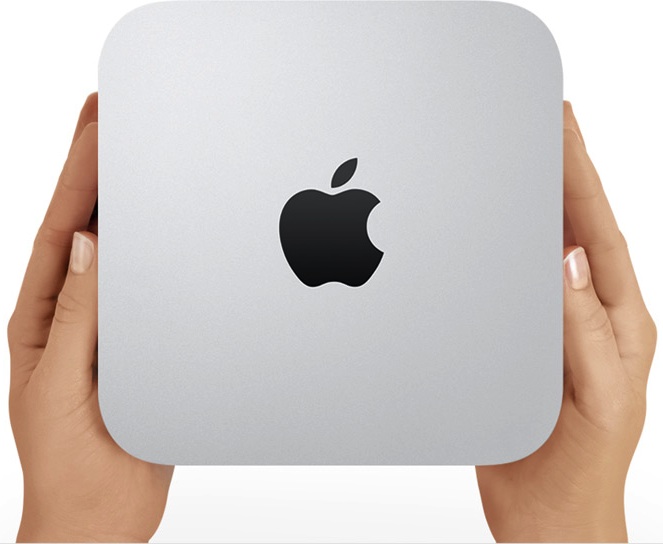
Apple Mac Pro is £2,499 and that's before you add a monitor. For a more cost-effective option is to choose a Mac mini and connect to a second screen.

Mac Mini
Starting from £399.
1.4GHz
1.4GHz dual-core Intel Core i5 (Turbo Boost up to 2.7GHz) with 3MB on-chip shared L3 cache
500GB (5400-rpm) hard drive
Configurable to 1TB Fusion Drive.
4GB of 1600MHz LPDDR3 memory
Configurable to 8GB or 16GB
Intel HD Graphics 5000

WACOM Intuos Pro Medium Special Edition PTH-651S-ENES Graphics Table
Ambidextrous design
Customisable key
ExpressKeys
With stylus
Other features
Stylus with eraser
GENERAL
Colour: Silver and black
System requirements- Windows 8
- Windows 7
- Windows Vista SP3 or Windows XP
- Mac OS X 10.5.8 or higher
- Intel®-processor
Software included Driver
Box contents Wacom wireless kit
Minimum Software Requirements:
Photoshop:
Nikon D3200 specification highlights:


Write a report in which you recommend a computer system for the marketing department to purchase.
You must consider ALL the hardware and software needed to complete the designs, think about the software minimum system requirements before deciding on components.
Explain why you have chosen the components and include the current cost of each component.
Choosing a computer you want to buy depends entirely on the consumer. You may be used to specific operating systems like Windows or Mac so changing your operating system may not be a good idea if you don’t want to try something new. But if you do want to change you need to make sure that you have fully research how the operating system works and whether it would be ideal for you. As well as that you need to decide what make and model you would like to have and also how you want your computer to run. And most importantly how much money are you willing to pay for it.
With the cost of your computer being the most important you also need to find the computer with the best specification to suit your budget. As technology is always being updated and developed it would probably be best to buy a computer that is fairly up to date, if not then your computer will go out of date pretty quickly.
I am recommending an Apple Mac computer because Macs are often used by designers and each Mac is best for different types of work. Most graphic designers work on a digital format and Mac offers a wide range of software support.
Graphic design is also a varied subject and the computer need to be able to use Photoshop, interactive design, animation and even 3D design. All of these need different computer skills and different computer setups.
Graphic Designers need a big canvas to work on , or in this case a big screen. Naturally Macs are better for this as well as the quality of the images on the screen are displayed. A MacBook Pro with a Retina Display or a 27-inch iMac are the ones that naturally lead us to this. Design work can use up a lot of the computers processor and memory especially when it comes to designing work in 3D, also the sizes of the files are very large and need a lot of room to save so for this kind of work you need to have a fast running system and a lot of hard drive room. Thankfully you can get additional hard drives so you have extra room to save files.
However Mac's are not suited for every designer. Apple computers come with a 'glossy' display and these are best for video and digital graphic design work, but these displays do not offer the same quality of printing as 'matt' displays so print designers tend not to use Apple computers.
If you work in magazine, leaflet/flyer creation or product packaging development then you may prefer to use a high quality matt monitor.
Traditionally designers have chosen Mac Pro computers, and the new Mac Pro's are powerful - maybe a little more powerful than anyone need.
Specification
Apple Mac Pro is £2,499 and that's before you add a monitor. For a more cost-effective option is to choose a Mac mini and connect to a second screen.
3.7GHz
Quad-Core
Intel Xeon E5 with 10MB L3 cache and Turbo Boost up to 3.9GHz
Configurable to 3.5GHz 6-core processor with 12MB L3 cache, 3.0GHz 8-core processor with 25MB L3 cache or 2.7GHz 12-core processor with 30MB L3 cach
12GB
DDR3 ECC memory
12GB (three 4GB) of 1866MHz DDR3 ECC memory
Configurable to 16GB (four 4GB), 32GB (four 8GB) or 64GB (four 16GB)
Dual AMD FirePro
D300
graphics processors
Dual AMD FirePro D300 graphics processors with 2GB of GDDR5 VRAM each
1,280 stream processors
256-bit-wide memory bus
160GB/s memory bandwidth
2 teraflops performance
Configurable to dual AMD FirePro D500, each with 3GB GDDR5 VRAM, 1,526 stream processors, 384-bit-wide memory bus, 240GB/s memory bandwidth and 2.2 teraflops performance; or dual AMD FirePro D700, each with 6GB of GDDR5 VRAM, 2,048 stream processors, 384-bit-wide memory bus, 264GB/s memory bandwidth and 3.5 teraflops performance
Mac Mini
Starting from £399.
1.4GHz
1.4GHz dual-core Intel Core i5 (Turbo Boost up to 2.7GHz) with 3MB on-chip shared L3 cache
500GB (5400-rpm) hard drive
Configurable to 1TB Fusion Drive.
4GB of 1600MHz LPDDR3 memory
Configurable to 8GB or 16GB
Intel HD Graphics 5000
WACOM Intuos Pro Medium Special Edition PTH-651S-ENES Graphics Table
Ambidextrous design
Customisable key
ExpressKeys
With stylus
Other features
Stylus with eraser
GENERAL
Colour: Silver and black
System requirements- Windows 8
- Windows 7
- Windows Vista SP3 or Windows XP
- Mac OS X 10.5.8 or higher
- Intel®-processor
Software included Driver
Box contents Wacom wireless kit
Minimum Software Requirements:
Photoshop:
- Multicore Intel processor with 64-bit support
- Mac OS X v10.7, v10.8, v10.9, or v10.10
- 2 GB of RAM (8 GB recommended)
- 3.2 GB of available hard-disk space for installation; additional free space required during installation (cannot install on a volume that uses a case-sensitive file system or on removable flash storage devices)
- 1024x768 display (1280x800 recommended) with 16-bit color and 512 MB of VRAM (1 GB recommended)
- OpenGL 2.0–capable system
- Internet connection and registration are necessary for required software activation, membership validation, and access to online services.
LightRoom:
- Multicore Intel processor with 64-bit support
- Mac OS X Server v10.7, v10.8, v10.9, or v10.10
- 2 GB of RAM (8 GB recommended)
- 2 GB of available hard-disk space; additional free space required during installation (cannot install on a volume that uses a case-sensitive file system or on removable flash storage devices).
- 1024 x 768 display
- Internet connection and registration are necessary for required software activation, membership validation, and access to online service
Illustrator:
- Multicore Intel processor with 64-bit support
- Mac OS X v10.7, v10.8, v10.9, or v10.10
- 2 GB of RAM (8 GB recommended)
- 2 GB of available hard-disk space for installation; additional free space required during installation (cannot install on a volume that uses a case-sensitive file system or on removable fl ash storage devices)
- 1024 x 768 display (1280 x 800 recommended)
- Internet connection and registration are necessary for required software activation, validation of subscriptions, and access to online services
InDesign:
- Multicore Intel processor
- Mac OS X v10.7, v10.8, v10.9, or v10.10
- 2 GB of RAM (8 GB recommended)
- 2.6 GB of available hard-disk space for installation; additional free space required during installation (cannot install on a volume that uses a case-sensitive file system or on removable flash storage devices)
- 1024 x 768 display (1280 x 800 recommended) with 32-bit video card; supports Retina display
- Adobe® Flash® Player 10 software required to export SWF files.
- Internet connection and registration are necessary for required software activation, validation of subscriptions, and access to online services
Nikon D3200 specification highlights:
- 24MP CMOS sensor
- ISO 100-6400 (plus ISO 12,800-equivalent Hi1 setting)
- Expeed 3 processing
- 3.0", 920k dot screen
- Full HD 1080p30 video (with 25p and 24p options)
- Microphone socket
- Twin IR remote receivers
- 4 frame-per-second continuous shooting
- Guide mode
| £318.23 |

Epson Perfection V370 Photo 4800 dpi scanner with ReadyScan LED technology
£89.99- High resolution - 4,800 dpi for high-quality
- Transparency unit - scan slides, film and negatives
- Flexible - scan bulky books and 3D objects
- Convenient - scan-to E-mail or cloud storage
- No warm-up time

Epson WorkForce WF-3520DWF 4-in-1 Printer with Double-sided Printing - £79.99
- Print, scan, copy and fax with ADF
- Print up to 15 pages per minute
- Wi-Fi and Ethernet
- Comes with 6.3 cm LCD screen
- Freedom to print and scan anywhere

Tuesday, 9 December 2014
UNIT 2 TASK 4 (M1)
Develop a table that can be included in your web pages that compares the features and functions of Windows XP and Mac OS in the following areas;
|
Functions
|
Windows XP
|
Mac OS
|
|
Machine and
Peripheral Management
|
The operating system
controls the whole system and all of the components. It also controls
peripherals such as: keyboards, mouse, printers etc. For example: Windows controls the monitor by changing the
resolution of the screen.
|
On Mac OS the controls of
the computer components are similar to Windows XP but almost all of the
devices needed are specifically for Mac. For example: Mac OS can control
keyboard by changing the input language. For other devices like iPhone, Mac
OS can control the screen and change it to landscape mode.
|
|
Security
|
The operating system needs
to make sure that everything functions properly and to make sure that
unauthorised data doesn’t harm your computer. Windows has security functions
such as: user accounts with password protection, firewall and other functions
to keep your information and data safe.
|
The Mac OS operating
system has security features like application sand boxing this protects the
system by limiting the operations an application can perform, such as opening
documents or accessing the network. Sand boxing makes it much more difficult
for a security threat to take advantage of a specific application that can
also affect the system. There is also authentication for file sharing, where
the user has to input his/her Apple ID and password to log in to a Mac for
file sharing. If others need to access a folder on a mac, the user is
required to enter their Apple ID details to log onto the system.
|
|
File Management
|
Every Windows system provides
easy access to a file or folder. When you open any file on your computer you
can select a file or a folder and then click a task to either rename, copy,
move or delete it. The My Documents, My Pictures and My Music folders can help
you manage your documents, pictures and music files. In My Computer you can
view and select your drives on your computer and the files that are stored on
it.
|
On Mac is it very easy to
access your files and folders. On all Mac user accounts there is a ‘Home
Directory’ section. IF you click the option you will find Desktop, Documents,
Downloads, Movies, Music, Pictures and also a Public folder where most of
your files are stored.
|
|
Device Drivers
|
Device drivers are programs
that tell the operating system how and what to do with a specific device. For
example when you buy a new graphic card, to make it work properly with all of
its power and efficiency you need to install drivers that are compatible with
the card.
|
Just the same as Windows XP
the drivers are programs that control
the devices. On Mac OS needed driver to run the computer is included in
system. But when you want to install a new printer, you have to install a
version of driver for Mac OS specifically.
|
|
Features
|
Windows XP
|
Mac OS
|
|
Ability to Customise
|
There are many ways you can customize Windows to
make your computer more accessible and easier for the user, this is called accessibility.
Accessibility features have been built in to Windows to help users who have
difficulty typing, using a mouse, have bad eyesight/vision or are deaf or
hard of hearing. The features can be installed during Setup, or you can add
them later from Windows installation disks.
You can use Control Panel and other built-in
features to adjust the appearance and behaviour of Windows to suit your needs
and preferred settings. These include adjusting colours and sizes, sound
volume, and the behaviour of the mouse and keyboard. The Accessibility Wizard
also helps you configure Windows. Dvorak keyboard layouts make the most frequently
typed characters more accessible if you have difficulty using the standard
keyboard layout.
|
Whilst using a Mac operating system it is
relatively difficult to customize your computer because there are limited
options. It requires additional software to customise most of the desktop and
menu features. Without the additional software there is virtually nothing
that a user can do to customise their features other than changing the
background of the desktop. With the correct
software however, you can do plenty to customise your Mac. System
preferences control the system-wide settings and are available from the apple
at the upper left corner of the screen. System preferences allows you to
adjust things such as: screen resolution, keyboard controls, mouse controls,
sound, printer, settings, sharing settings and accounts which is basically
the same as what Windows XP allows you to do.
|
|
Support for Connectivity of Portable Media
|
Windows XP supports almost every type of portable
media. Windows XP supports all media including ones that can be connected via
USB ports such as: phones and cameras and headphones as well as voice
control, Ethernet cables for internet, CDs and DVDs and your typical computer
peripherals such as: monitors and mice.
|
The Mac OS supports the typical computer
peripherals such as: computer mouse, monitor and keyboards, they also
support, headphones, CDs and DVDs, USB ports for cameras and phones, as well
as Ethernet cables for internet just like Windows XP.
|
|
|
|
|
|
Stability and Reliability
|
It is mostly down to applications that are
installed on the computer rather than the core of the operating system.
Windows offers more of a wider range of them, so therefore has more potential
stability problems.
|
Mac OS offers less of a wider range of applications
than Windows does so therefore is potentially more stable and reliable than
Windows.
|
|
Ease of Management
|
I would say that Windows XP is easier to use, but
it does depends on the user themselves and whether they are more comfortable
with either system. But because the Windows operating system seems to be most
popular with the customers, I would say the Windows operating system in
easier to use.
|
Mac OS and Windows are very similar as it mainly
depends on the user. Mac OS is a newer type of operating system so users may
find this system has a bit more difficulty than Windows that has been around
much longer and for consumers that are used to the way the system runs.
|
|
Associated Utilities
|
Windows doesn’t have much range but it does have
little things like the DirectX drivers, Bing toolbars, Windows Languages
which lets you download different languages for your Windows System.
|
Mac OS has a wider range of choice compared to
Windows when it comes to utilities. There are plenty of apps and drivers that
can be installed for example for hardware you can download Drive Genius,
Watts and SMART Utility and for Files you can download Blast and Berokoyo
that helps to organise your files.
|
Subscribe to:
Posts (Atom)